Font With Slashed Zero Numbers
For some printouts, it may be beneficial to use a font that has a zero with a slash through it rather than the standard zero without a slash. This is called a “slashed zero”.
There are several such fonts already installed in Google Docs. They are Consolas, Inconsolata, Roboto Mono, and Share Tech Mono fonts. You’ll need to experiment with whatever font you select to see what looks best for your document.
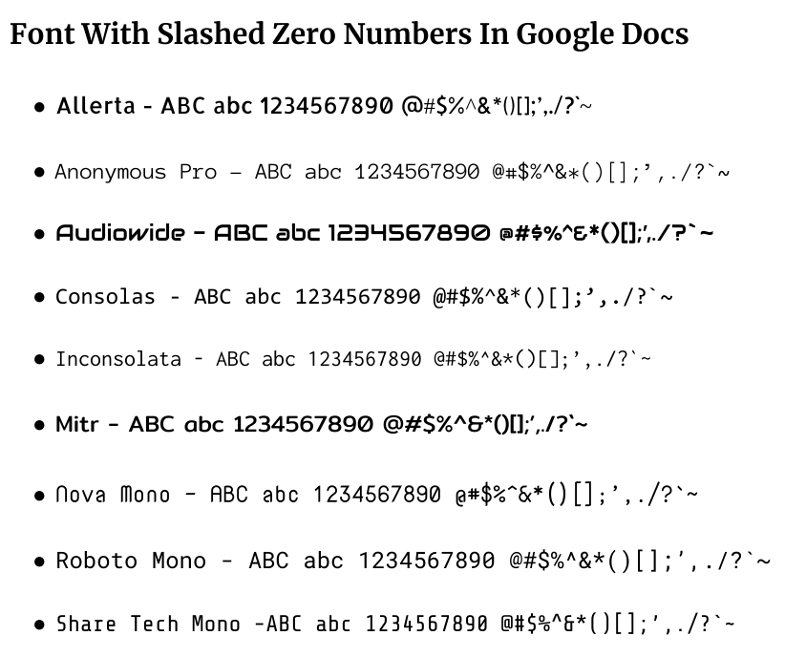
Font with slashed zero descriptions – Allerta Anonymous Pro Audiowide Consolas
Inconsolata Mitr Nova Mono Roboto Mono Share Tech Mono
To add fonts in Google Docs
- Go to the font drop-down menu.
- Select “More fonts” at the top.
- Make sure “Show all fonts” is selected at the top.
- Search for the font you want in the font list.
- Click on the font you want to add it to the “My Fonts” list at the right.
- Click the blue OK button to close out the box.
Here are a few more fronts suggested by Mike B, these fonts are not in Google docs but can be installed in Windows.